

IFC Verify runs entirely in your browser — audit, edit, and compare IFC files with no uploads, no installs, and no file ever leaving your machine.
Most IFC quality control workflows look the same: export from Revit, open in a desktop tool, wait for it to load, find the issues, write up the BCF, send it back, wait three days for the next revision. IFC Verify compresses that loop to under a minute, running entirely in your browser, with no uploads, no installs, and no file ever leaving your machine. Here's what it does and how it works.
Why Browser-Native Changes the Equation for IFC Work
There are web-based BIM tools out there, but most of them follow the same pattern: the interface lives in the browser, but your files still travel to a server for processing. For teams working on public infrastructure, healthcare, or government projects — where uploading a model to a third-party cloud is a legal gray area or a hard contractual restriction — that distinction matters.
IFC Verify is built differently. The entire parsing engine, validation logic, and 3D renderer run locally as a WebAssembly module inside your browser tab. Your files never touch a server. That's not a configuration option — it's the architecture.
The practical upside goes beyond compliance. No installation. No IT ticket. No license server. No waiting for a cloud job to finish. Open the URL, drag in a file, start working.
Running locally doesn't mean you sacrifice the interface. The 3D renderer is WebGL-based and handles large, complex models without the sluggish performance or visual degradation you typically see in browser-based BIM tools. Most validation tools in this space treat the 3D view as an afterthought — a basic viewport to confirm you're looking at the right element. IFC Verify treats it as a first-class part of the workflow.
IFC Audit: Full Property Report in Under 10 Seconds
Drop an IFC file into the browser, and within ten seconds you get a structured audit report broken down by element type and PropertySet.
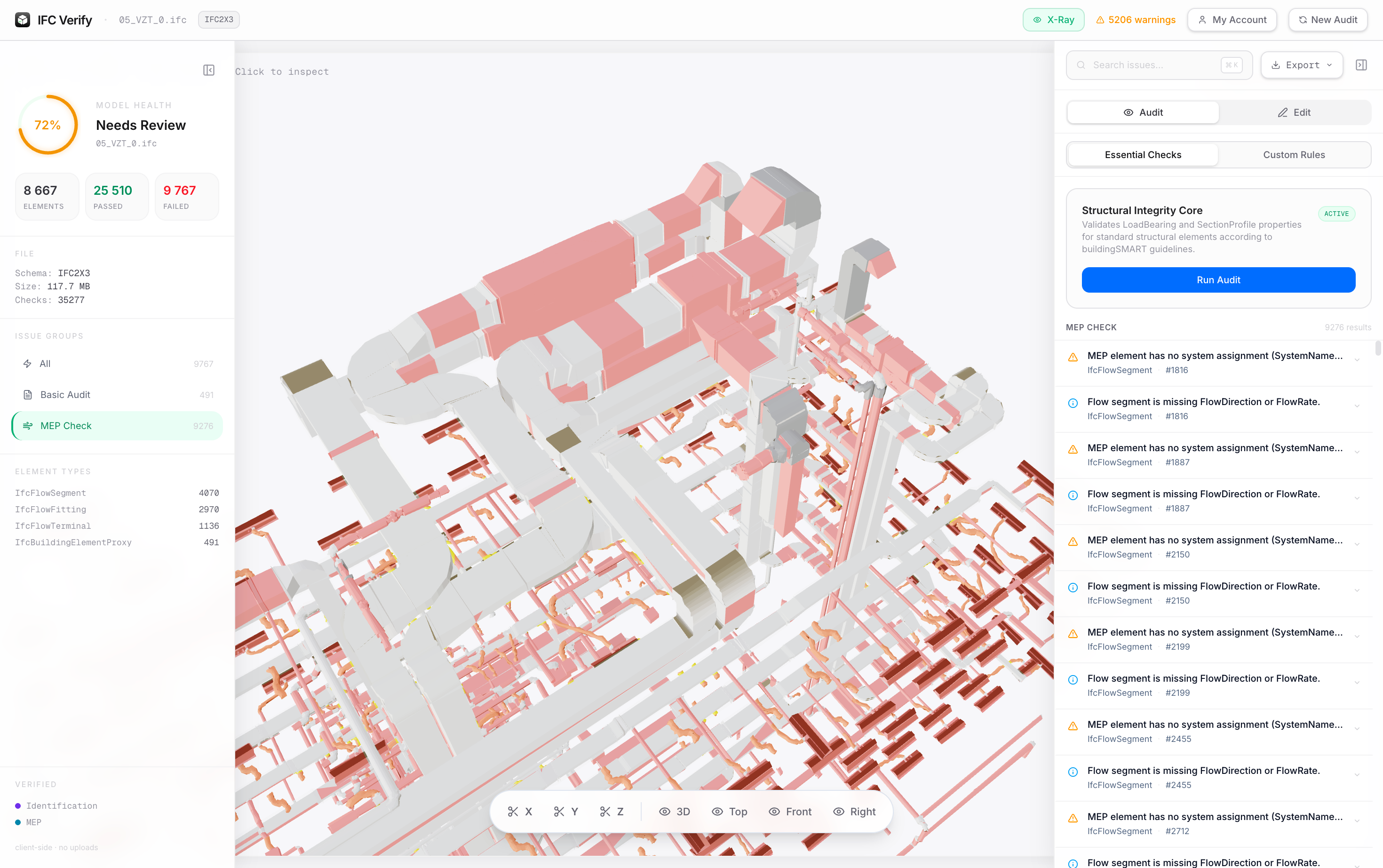
The validator checks against buildingSMART schema requirements across IFC 2x3, IFC 4, and IFC 4.3. What that looks like in practice: Pset_WallCommon.FireRating missing on 31 elements, Pset_BeamCommon.LoadBearing unset on every IfcBeam in Grid C, IfcDoor instances with no material assignment. Each finding is clickable. Select an issue and the viewer jumps directly to that element, with failing geometry highlighted so you see exactly where the problem lives in the model.
This replaces the manual workflow of opening a model in Revit, running a schedule, exporting to Excel, and filtering for blank cells. For a model with a few thousand elements, that process takes the better part of an hour. The audit takes ten seconds.
3D Viewer and In-Browser Property Editing
The 3D viewer handles large models (hundreds of megabytes) without performance degradation. It supports sectional clipping planes, so you can isolate a specific floor or building section without loading a separate tool. Clicking any element in the viewport surfaces its full metadata: GlobalId, element type, name, and every PropertySet with current values.
The part that changes the QC workflow: you can edit those properties directly in the browser. If you receive a model from a subcontractor with 47 IfcDoor elements missing Pset_DoorCommon.FireRating, you don't have to send the file back and wait for a corrected version. Add the values in IFC Verify, export a buildingSMART-compliant IFC, and keep moving.
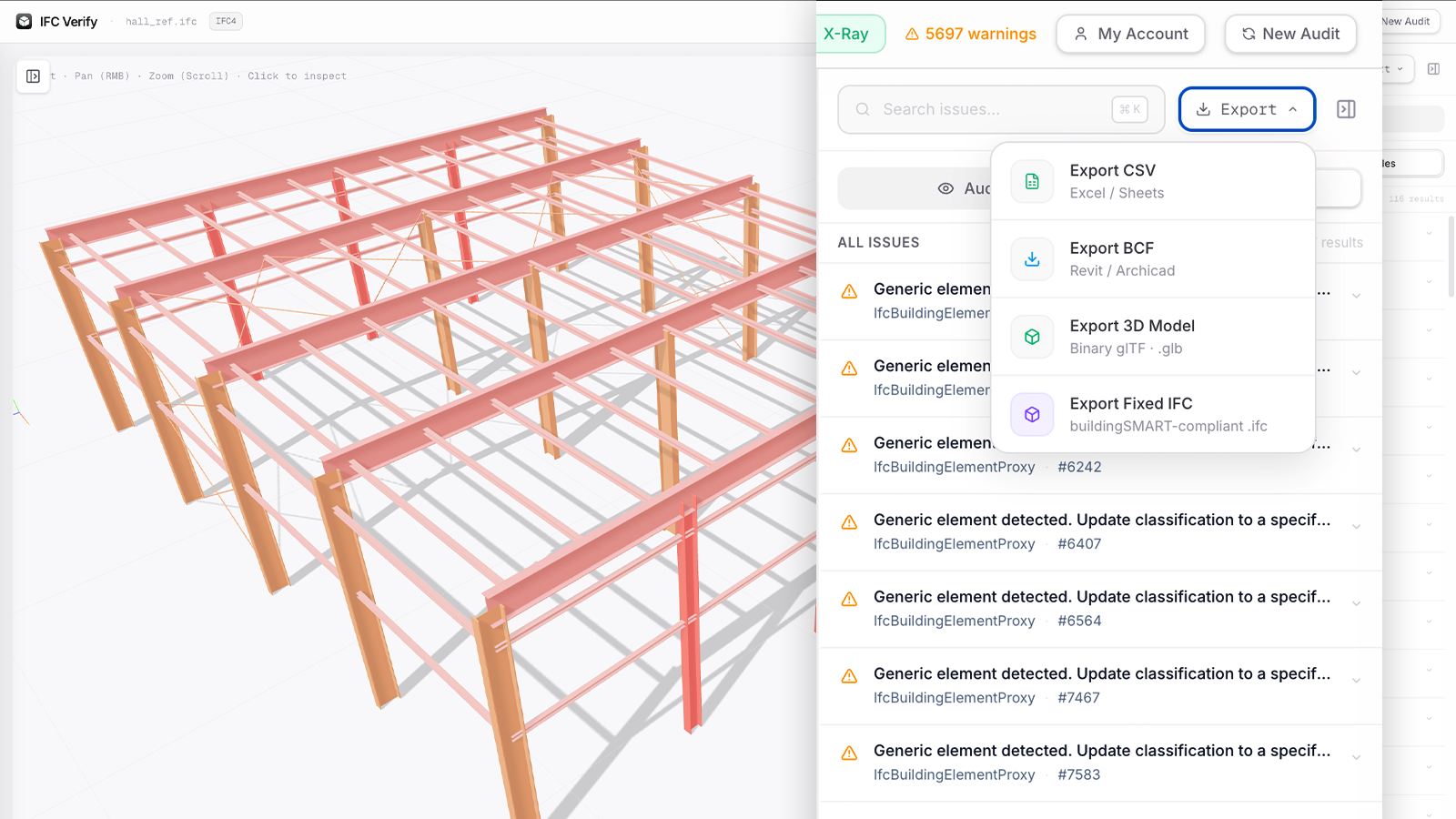
Export options from a corrected model include a buildingSMART-compliant IFC, BCF 2.1 for issue tracking in Revit, Navisworks, or Solibri, CSV for data review in Excel, and GLB for lightweight 3D sharing or web viewers.
IFC Diff: Exactly What Changed Between Revisions
"Here's the updated model" is one of the most dreaded sentences in BIM coordination. Without a proper diff tool, comparing two IFC revisions means either eyeballing the model or writing your own script to parse the files.
IFC Verify's Diff Viewer compares two files by GlobalId and produces a clean delta: elements added, elements removed, and elements where metadata changed, right down to the specific property and its before/after value.
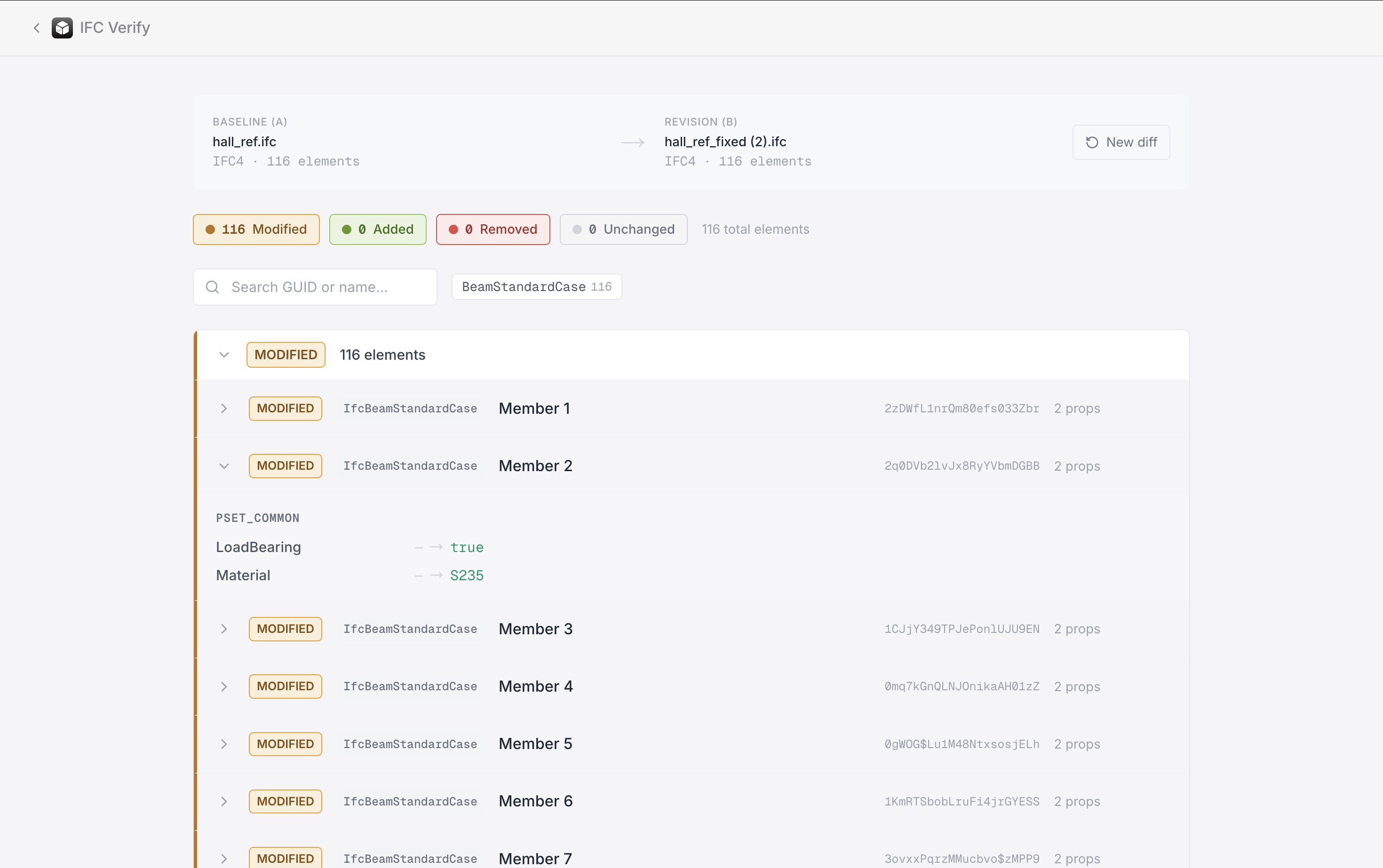
Every changed element links directly to the 3D viewer: click it and the viewer centers on that element in the model so you can verify the change in geometric context, not just as a row in a table. You can confirm that the subcontractor fixed what they were supposed to fix, and flag anything new that appeared in the updated file, without opening either model in a separate application.
AI Integration: Natural Language Queries Over IFC Data
IFC is a structured data format. That makes it a strong candidate for AI-assisted querying and bulk operations — not as a gimmick, but as a genuine productivity layer over data that has a predictable schema.
I'm currently integrating AI capabilities into IFC Verify with a specific goal: natural language interaction with the model's property data. The kind of queries this enables: "Which exterior walls on floors 1 through 3 are missing fire ratings?" or "Assign material Concrete C25/30 to all columns in structural zone A." The application executes the operation across the full model.
This isn't a distant roadmap item — it's the next major feature in active development. If you're working with large models where bulk property assignment is a regular task, this is worth keeping an eye on.
Try IFC Verify Free for 7 Days
IFC Verify is available at ifc-verify.app. You can run a basic audit without an account. Just drag in a file. Full access to property editing, BCF export, Diff Viewer, and all export formats requires a Pro plan, which comes with a 7-day free trial. No credit card required at signup.
If IFC quality control is part of your regular workflow, the fastest way to know whether this fits is to run it against a real file.
IFC Verify
Try IFC Verify free for 7 days
Audit, edit, and diff IFC files — 100% in the browser, no uploads.