IFC Verify

IFC Validator & BIM Editor — Fix, Validate and Export IFC Files in Your Browser.

Stop wrestling with heavy desktop software. IFC Verify is a browser-based IFC validator and BIM editor that audits PropertySets, fixes missing data, and exports corrected IFC files — 100% locally, zero cloud upload.

Open Workspace

Every format your BIM workflow needs.

Auto-Healed IFC

Download buildingSMART-compliant IFC files with corrected PropertySets instantly.

BCF 2.1 Export

Seamless issue tracking for Revit, Navisworks, and Solibri.

CSV & Excel

Extract raw BIM data and PropertySets for spreadsheet analysis.

GLB 3D Export

Export lightweight 3D models for seamless web integration.

Soon

PDF Reports

Generate clean, visual audit reports for project managers.

Five steps. No installation required.

A complete BIM audit and data correction pipeline that runs entirely in your browser.

Step 01
Upload Instantly
Step 02
Smart Audit
Step 03
In-Browser Editing
Step 04
Export & Coordinate
Step 05
Compare Changes
Ready to audit your model?
Drop your IFC file and get a full report in seconds.
Try IFC Verify — Free
Upload Instantly
No cloud uploads, no processing queues. Drop your IFC file and 100% client-side WebAssembly parsing starts immediately for maximum security.
Smart Audit
Automatically verify structural properties (LoadBearing, Material, ProfileName) and architectural data (FireRating, IsExternal, GFA classification).
In-Browser Editing
Missing a section profile or fire rating? Fix it directly in the browser. Our Edit Mode writes to the correct IFC PropertySet — no manual STEP editing.
Export & Coordinate
Download the corrected IFC file immediately, ready for Revit, Archicad, or Solibri. Or export a BCF report for your coordination workflow.
Compare Changes
Load two IFC revisions and see exactly what changed — added, removed, or modified elements matched by GlobalId. Drill into property-level deltas across every PropertySet.

Engineered for real project conditions.

Instantly audit, fix, and export buildingSMART-compliant models directly in your browser. Zero cloud, absolute security, maximum control.

Core Architecture

100% Local processing —
zero cloud uploads.

Parse massive IFC models (2x3, 4, 4.3) using WebAssembly, without your data ever leaving your machine. Perfect for secure and confidential projects.

Try it free
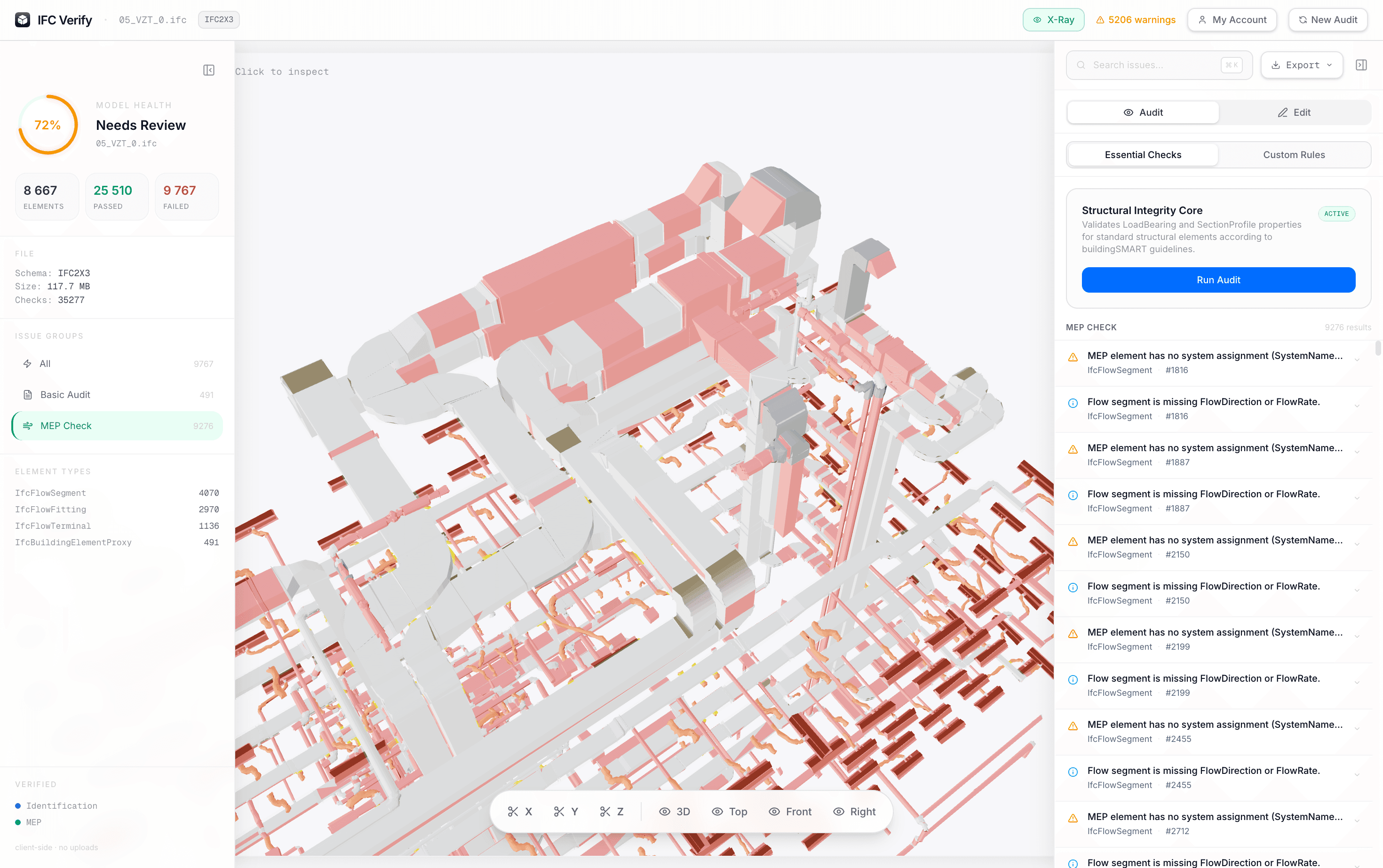
IFC Verify workspace showing a HVAC/MEP IFC model with PropertySet audit results and missing data flags highlighted in the right panel
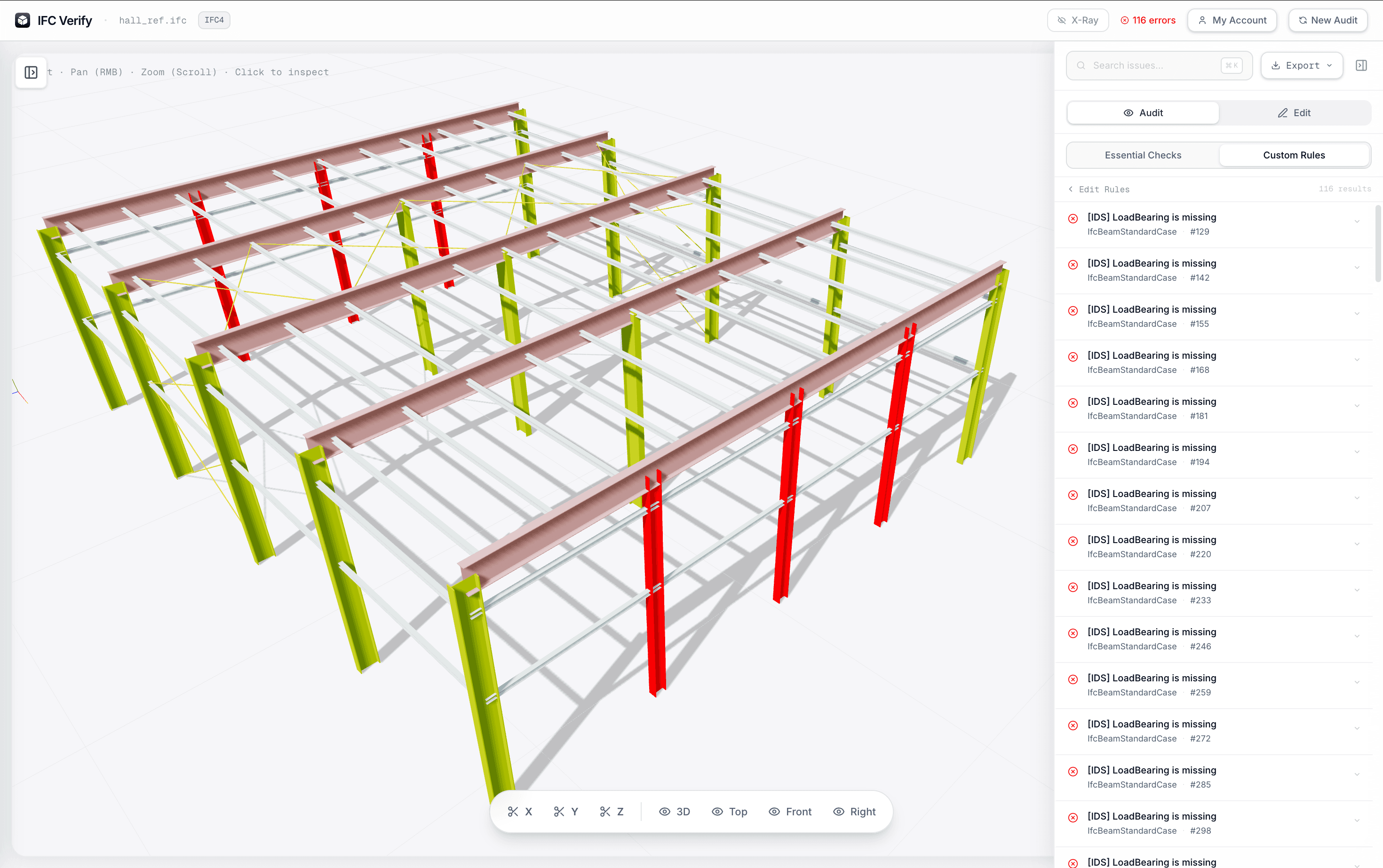
IFC Verify validation panel showing auto-flagged missing PropertySets on IfcBeam and IfcColumn elements in a steel hall structural model
Validation

Auto-flag missing properties.

Instantly validate all PropertySets against buildingSMART requirements or your custom constraints.
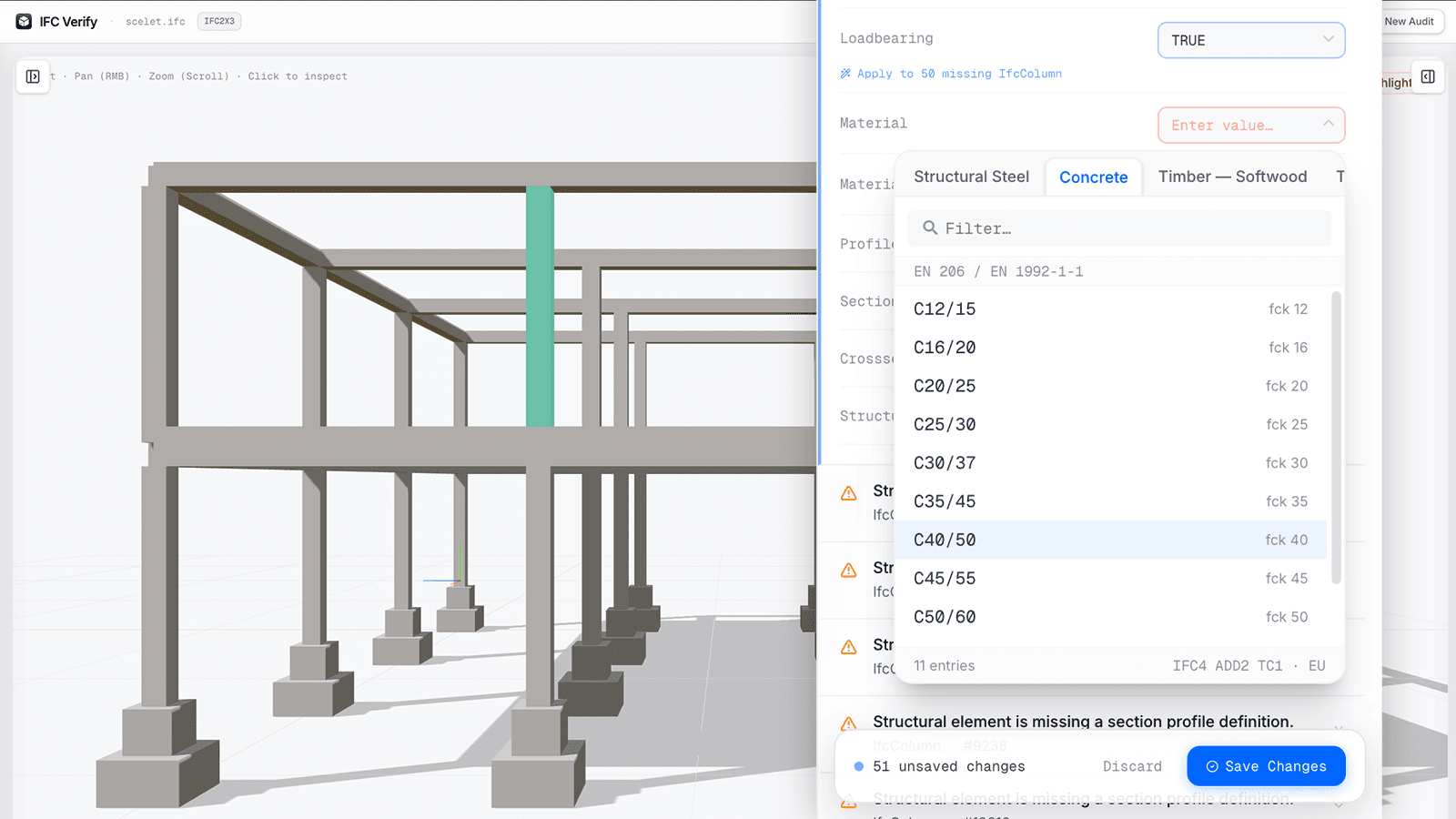
IFC Verify in-browser data editor with inline PropertySet editing, showing material and structural property fields being corrected without Revit
Editing

Correct data without Revit.

Write Fire Ratings or LoadBearing tags directly back to the IFC PropertySet, eliminating tedious round-tripping.
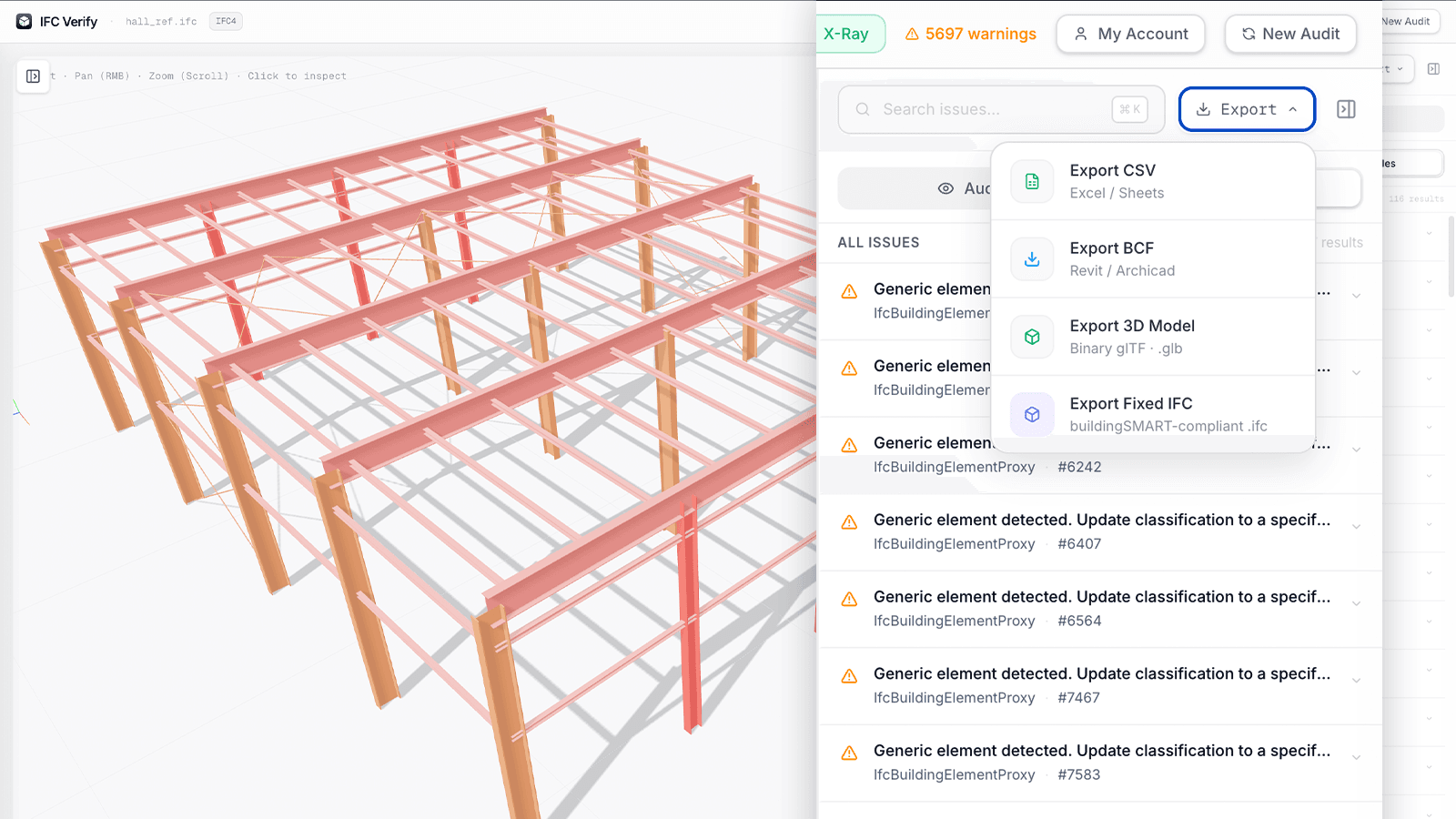
IFC Verify export panel showing one-click export options: auto-healed IFC file, BCF 2.1 issue report, and CSV data schedule ready for download
Export

Export to BCF, CSV & fixed IFC.

Share issues via BCF, extract data to CSV, or download a corrected buildingSMART-compliant IFC file instantly.

Coming Soon

AI that understands IFC.

Chat with your model. Find missing data, bulk-assign materials to hundreds of elements, generate audit reports — without clicking through every element manually.

Get early access

Join the waitlist

Simple, honest pricing.

Start your 7-day free trial today. No credit card required. Cancel anytime.

7-Day Full Trial

0

for your first 7 days

Experience the full power of IFC Verify with absolutely zero risk.

  • Full access to all Pro features
  • Unlimited model size & audits
  • Export to BCF, CSV & fixed IFC
  • No credit card required
  • Cancel anytime
Most Popular
Pro Plan
24/month

Billed annually · 290/year

|
  • 100% local WASM processing — zero cloud uploads
  • Deep PropertySet traversal (IFC 2x3 · 4 · 4.3)
  • BCF 2.1 export (Revit · Navisworks · Solibri)
  • 3D model export to GLB
  • CSV / Excel-compatible audit reports
  • Auto-Healing IFC writer (buildingSMART-compliant)
  • Interactive 3D clipping planes
  • Unlimited model audits

IFC Verify FAQ

Find answers to technical questions about security, supported schemas, and BIM coordination workflows.

No. IFC Verify runs entirely locally in your browser using WebAssembly (WASM). Your BIM data is processed directly on your machine's CPU/GPU and never leaves your device, ensuring full compliance with strict NDAs and ITAR regulations.

Since processing is local, the limit depends entirely on your machine's RAM. Modern engineering workstations can comfortably handle, parse, and render IFC models up to 1 GB in seconds.

You can instantly export a BCF 2.1 (BIM Collaboration Format) file. Your team can import this directly into Revit, Navisworks, or Solibri to automatically snap the camera to the problematic elements.

No. Our Auto-Healing IFC writer is strictly buildingSMART-compliant. It safely appends the missing properties without altering the core geometry, structure, or GUIDs of your original model.

You can fix issues directly in the browser. If a sub-contractor forgets to add a Fire Rating or a LoadBearing tag, our editor lets you write the correct value right back to the IFC PropertySet. This eliminates the need to reopen heavy authoring tools like Revit or Archicad just to fix metadata.

Ready to audit your model?

Drop your IFC file and get a full audit report in under 10 seconds. No sign-up. No server. No compromise.

Launch IFC Verify — Free